Key Takeaways
- A chart of accounts organizes every financial transaction in your property business into categories. Think of it as a filing system for your money. Every dollar that flows in or out gets assigned to a specific account so you can track it, report on it, and plan around it.
- Property management charts of accounts are built around five core categories. Assets, liabilities, equity, revenue, and expenses. Everything else is a sub-account under one of these five.
- HOA and rental property charts of accounts look different. HOAs need fund-based tracking (operating fund, reserve fund, special assessments). Rental portfolios track by property and unit. The structure matters because it affects your reporting, tax filings, and financial clarity.
- Block numbering keeps your chart organized as you grow. Assigning number ranges (1000s for assets, 2000s for liabilities, etc.) gives you room to add accounts without breaking your system.
- The right software eliminates most of this manual work. Platforms built for property management come with chart of accounts templates designed for HOAs and rentals, so you’re not building from scratch in Excel.
Property Management Chart of Accounts: A Complete Setup Guide
Every dollar that moves through your property business needs a place to live.
Rent payments. Assessment collections. Insurance premiums. Maintenance invoices. Reserve fund contributions. Mortgage payments. Vendor checks. Utility reimbursements.
If you’re tracking all of that in spreadsheets or a general accounting tool, you’ve probably felt the pain. Transactions get miscategorized. Reports don’t make sense. Tax time turns into a scavenger hunt.
A chart of accounts fixes this. It’s the financial backbone of your property management operation, whether you manage three rental units or three hundred HOA communities.
This guide walks you through how to set one up from scratch, with specific examples for both HOA managers and rental property owners. We’ve also included a free downloadable template to save you the trouble of building one from zero.
What Is a Chart of Accounts?
A chart of accounts is a structured list of every financial account in your business.
That’s it. No mystery to it.
Every type of financial activity, income, expenses, assets, debts, and owner equity, gets its own account number and name. When money moves, you record it against the right account. Over time, those records become the reports you use to understand your business.
The easiest way to think about it: a chart of accounts is a filing cabinet for your finances. Every transaction is a document. Every account is a labeled folder. Without the filing system, you’ve got a pile of paper on a desk. With it, you can find what you need in seconds.
Your chart of accounts feeds directly into the reports that matter most. Balance sheets. Income statements. Cash flow reports. Budget vs. actual comparisons. Without a clean chart of accounts underneath, those reports are only as reliable as your best guess.
The Five Core Account Categories
Every chart of accounts, regardless of industry, organizes financial information into five major categories.
Assets
Assets are what your business owns. For property management, this includes bank accounts (checking, savings, escrow), the properties themselves, accumulated depreciation on those properties, and any equipment or vehicles.
If you manage HOAs, trust accounts holding homeowner funds are assets on your books. If you own rental property, the buildings and land are your biggest asset entries.
Liabilities
Liabilities are what your business owes. Mortgages, loans, lines of credit, and credit card balances fall here.
For HOAs, security deposits and prepaid assessments from homeowners are liabilities because that money belongs to the homeowner or the association until it’s earned or applied. For rental property managers, tenant security deposits work the same way.
Equity
Equity represents the owner’s stake in the business. This includes money you’ve invested (contributions) and money you’ve taken out (distributions).
For HOAs, the fund balances (operating fund balance, reserve fund balance) function like equity accounts. They represent what the association has accumulated over time.
Revenue
Revenue is money coming in. For rental properties, that’s primarily rent, plus parking fees, pet rent, laundry income, late fees, and application fees.
For HOAs, revenue includes regular assessments, special assessments, late fees, violation fines, amenity rental fees, and interest income on reserve accounts.
Expenses
Expenses are money going out. This is usually the longest section of any chart of accounts.
For rental properties: repairs, maintenance, insurance, property taxes, management fees, advertising, legal fees, utilities, and landscaping.
For HOAs: common area maintenance, landscaping, pool/amenity upkeep, insurance, management company fees, legal fees, utilities for common areas, reserve fund contributions, and administrative costs.
How to Set Up Your Chart of Accounts in 3 Steps
There’s no single standard for how a chart of accounts has to be structured. But there are conventions that make your life (and your accountant’s life) a lot easier.
Step 1: Set Up Your Numbering System
The first step is deciding how to number your accounts. The standard approach is block numbering, which reserves ranges of numbers for each category.
Here’s how it works:
- 1000-1999: Assets
- 2000-2999: Liabilities
- 3000-3999: Equity
- 4000-4999: Revenue
- 5000-5999: Expenses
Why blocks of 1,000? Because your business will grow. If you number your assets 1 through 20 and your liabilities 21 through 40, you’ll run into problems the moment you need a 21st asset account.
With block numbering, you’ve got plenty of room. And you get an instant visual cue: any account starting with a 2 is a liability, any account starting with a 4 is revenue. Your CPA will thank you.
Step 2: Build Out Your Sub-Accounts
Once your numbering system is in place, fill in the sub-accounts under each category.
This is where HOA and rental property charts of accounts start to diverge.
For rental property managers and landlords:
Your revenue accounts are straightforward. Rent is the primary account (4000), with sub-accounts for parking (4100), pet rent (4200), late fees (4300), application fees (4400), and laundry/vending income (4500).
Your expense accounts will closely mirror what you report on IRS Schedule E: advertising, auto and travel, cleaning, commissions, insurance, legal and professional fees, management fees, mortgage interest, repairs, supplies, taxes, utilities, and depreciation.
Asset accounts include your bank accounts, each property (with sub-accounts for individual buildings or units), and accumulated depreciation.
For HOA and community association managers:
Revenue accounts need to reflect assessment-based income. Regular assessments (4000), special assessments (4100), late fees and interest (4200), violation fines (4300), amenity rental fees (4400), and transfer/resale fees (4500).
Expense accounts get more granular: common area maintenance (5000), landscaping (5100), pool and amenity maintenance (5200), insurance (5300), management company fees (5400), legal fees (5500), utilities for common areas (5600), administrative costs (5700), and reserve fund contributions (5800).
The key difference for HOAs is fund-based accounting. More on that in the next section.
Step 3: Put It All Together
Once you’ve mapped your categories and sub-accounts, you have a working chart of accounts. Here’s what a simplified version looks like for a property management operation:
Assets (1000s)
- 1000: Operating Checking Account
- 1100: Savings Account
- 1200: Security Deposit Trust Account
- 1300: Reserve Fund Account
- 1400: Property/Building (with sub-accounts per property: 1401, 1402, etc.)
- 1500: Accumulated Depreciation
Liabilities (2000s)
- 2000: Mortgage Payable
- 2100: Line of Credit
- 2200: Credit Card
- 2300: Security Deposits Held
- 2400: Prepaid Assessments/Rent
Equity (3000s)
- 3000: Owner Contributions/Capital
- 3100: Owner Distributions/Draws
- 3200: Retained Earnings
- 3300: Operating Fund Balance (HOA)
- 3400: Reserve Fund Balance (HOA)
Revenue (4000s)
- 4000: Rent / Regular Assessments
- 4100: Special Assessments
- 4200: Late Fees and Interest
- 4300: Violation Fines / Other Fees
- 4400: Amenity/Parking/Laundry Income
- 4500: Transfer/Resale Fees
Expenses (5000s)
- 5000: Repairs and Maintenance
- 5100: Landscaping
- 5200: Insurance
- 5300: Property Taxes
- 5400: Management Fees
- 5500: Legal and Professional Fees
- 5600: Utilities
- 5700: Administrative/Office Expenses
- 5800: Reserve Fund Contribution (HOA)
- 5900: Depreciation
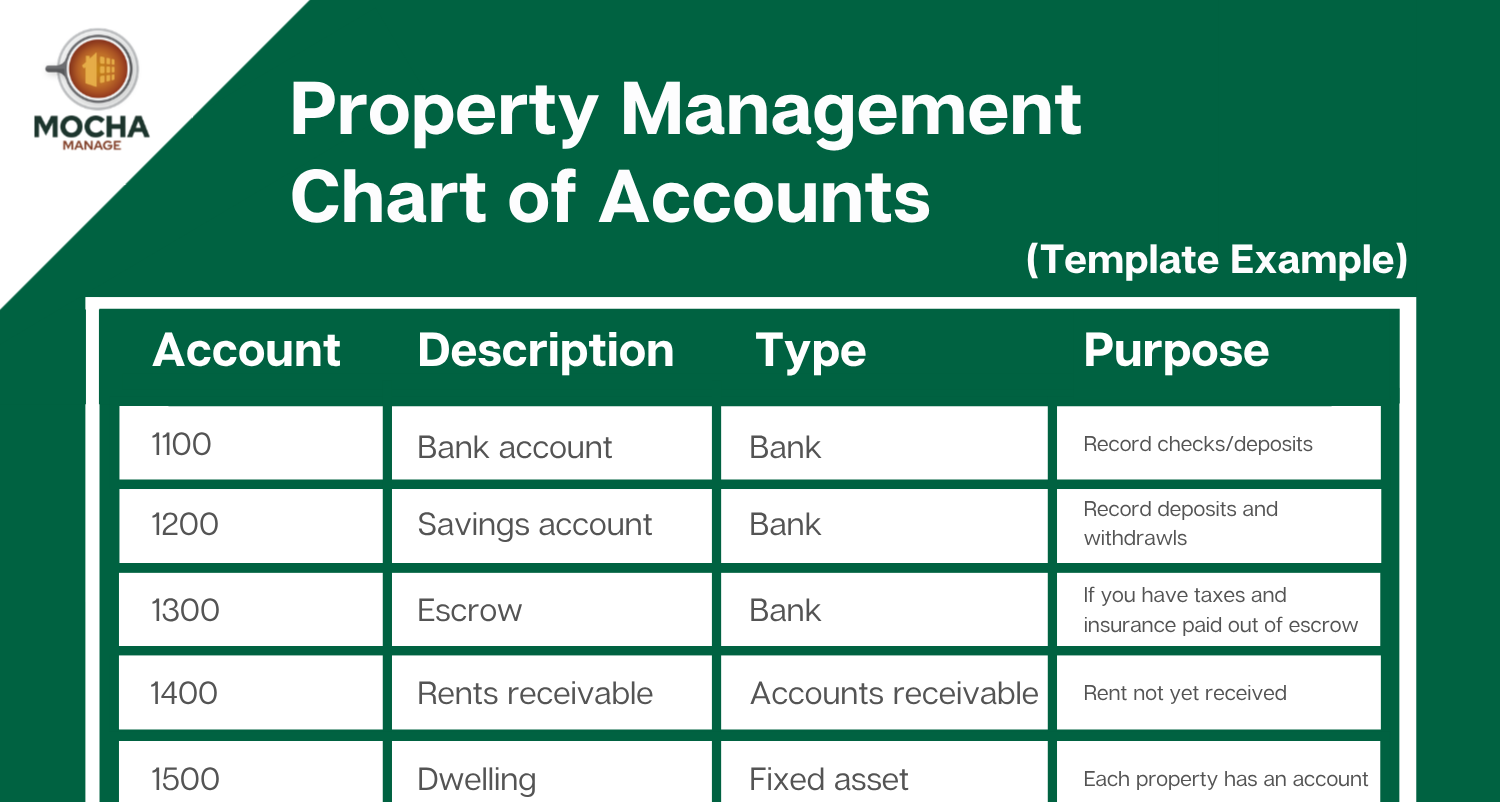
Here’s another example, a visual template to use as a starting point:

You can click here to download the template.
This is a starting template. Your actual chart will be more detailed based on the size of your portfolio and the complexity of your operations.
Creating Your Chart of Accounts In Minutes
You can use the template above as a starting point, combined with Mocha Manage’s straightforward dashboard and native accounting tools (meaning no QuickBooks integration).
First, start by going to More > Accounting, then click “Create Now”:

The pop-out screen has a full set of pre-made accounts based on the most commonly used. Just select the ones you need one by one, and the details and account name will be automatically populated.
Choose an account number (see the template above as a starting point if you don’t already have this decided), and you’re good to go:

Once you’ve added all your accounts, you can view your populated chart of accounts, which will be populated in real time as you add items.
Fund-Based Accounting for HOAs
If you manage HOAs or community associations, your chart of accounts needs an extra layer that rental property managers typically don’t handle: fund-based tracking.
HOAs don’t operate on a single pool of money. They separate finances into distinct funds, each with its own purpose and its own set of accounts.
Operating Fund
This is the day-to-day money. Regular assessments come in. Maintenance, insurance, management fees, and utilities go out. The operating fund covers the association’s annual budget.
Reserve Fund
This fund covers long-term capital expenses. Roof replacements, repaving, elevator upgrades, pool resurfacing. Reserve studies determine how much the association should be contributing each year to cover future costs.
Keep in mind, mixing operating and reserve funds is one of the most common (and most serious) accounting mistakes in HOA management. If your chart of accounts doesn’t clearly separate these two funds with distinct bank accounts and account numbers, you’re setting yourself up for audit problems and board confusion.
Special Assessment Fund
When a one-time expense exceeds what the operating and reserve funds can cover, the board may levy a special assessment. This should have its own set of accounts to track the collection and spending of those funds separately.
How This Affects Your Chart of Accounts
In practice, fund-based accounting means your chart of accounts has parallel structures. Your operating fund has its own revenue, expense, and bank accounts. Your reserve fund has its own revenue, expense, and bank accounts. They should never intermingle.
Some HOA managers handle this with separate account ranges (e.g., 4000s for operating revenue, 4500s for reserve revenue). Others use class or fund tags within their accounting software. Either approach works, as long as you can generate fund-specific financial statements when the board asks for them.
Tracking Multiple Properties
Whether you manage rental units or HOA communities, you’ll eventually need to track financials across multiple properties.
The simplest approach: add a layer of sub-accounts under your property-related accounts.
If your “Property/Building” asset account is 1400, each property gets its own sub-number:
- 1401: 123 Main Street
- 1402: 456 Oak Avenue
- 1403: 789 Pine Lane
- 1404: Maple Ridge HOA
This same approach works for revenue and expense tracking. You can create property-specific sub-accounts under each expense category (5000.01 for Repairs at 123 Main, 5000.02 for Repairs at 456 Oak) or use your software’s property/class tagging to slice the data without inflating your chart of accounts.
The goal is to be able to generate a profit and loss statement for each individual property. If you can’t do that, your chart of accounts needs more granularity.
Common Chart of Accounts Mistakes
Mixing Operating and Reserve Funds (HOA)
This is the big one. If operating fund expenses are paid out of reserve accounts (or vice versa), your financial statements become unreliable. The board can’t trust the numbers, and your auditor will flag it. Keep these funds completely separate in both your chart of accounts and your bank accounts.
Making It Too Simple
A chart of accounts with five expense categories might look clean. But when you need to know how much you spent on landscaping versus pool maintenance versus general repairs, a single “Maintenance” line won’t cut it. Build enough detail to answer the questions your reports need to answer.
Making It Too Complex
The opposite problem. Fifty expense sub-categories for a 20-unit community creates more work than it’s worth. Match your chart of accounts complexity to the size and needs of your operation. You can always add accounts later.
Not Separating Trust and Operating Accounts
If you’re a property manager holding security deposits or owner funds, those need to be in trust accounts and tracked separately in your chart of accounts. Commingling trust funds with your operating money is a compliance issue in most states.
Using a Generic QuickBooks Template
QuickBooks ships with default chart of accounts templates. They’re built for general small businesses, not property management. The truth is, you’ll spend more time modifying a generic template than you’d spend building a property-specific one from scratch. If you’re using QuickBooks, start with a property management template or build your own using the structure in this guide.
A Note on Owner vs. Property Manager vs. Landlord
How you structure your chart of accounts depends on your role in the relationship.
If you’re the property owner or investor, rent payments are revenue. Security deposits are liabilities (you owe them back). The property itself is an asset.
If you’re a third-party property manager, the rent you collect belongs to the owner, not you. Those payments should be listed under liabilities (funds held on behalf of clients) until you distribute them. Your revenue is the management fee you earn for your service.
If you’re managing an HOA, the assessment income belongs to the association. Your management fee is your revenue. The association’s operating and reserve funds are the association’s money, not yours.
Getting this distinction right in your chart of accounts prevents major reporting and compliance issues down the road.
Stop Building Your Chart of Accounts From Scratch
Setting up a chart of accounts manually works. But it takes time, attention to detail, and accounting knowledge that not every property manager or board treasurer has.
Mocha Manage was built by CPAs who are also property managers. The chart of accounts comes pre-configured for property management and HOA accounting, so you’re not starting from a blank spreadsheet.

Fund-based accounting for HOAs is built in. Operating funds, reserve funds, and special assessment funds are tracked separately from day one. No manual configuration to keep them from crossing. No workarounds to generate fund-specific financial statements for the board.
For rental property managers, the account structure follows the categories you’ll need for Schedule E reporting and property-level P&L tracking. Each property gets its own financial view without requiring you to build fifty sub-accounts by hand.

Assessment tracking, violation fines, reserve contributions, AP/AR, budgeting, and trust accounting all flow through a system designed by accountants who understand property management at a technical level. Not adapted from a general-purpose tool. Not bolted together from acquired products.
Pricing is transparent and per-unit. No custom quotes. No surprise fees. You can be running in days, not weeks.

Try Mocha Manage free to see what a CPA-built chart of accounts looks like when it comes ready out of the box.
Frequently Asked Questions
What is a property management chart of accounts?
A chart of accounts is a structured list of every financial account in your property business. It organizes income, expenses, assets, liabilities, and equity into numbered categories so you can track transactions and generate accurate reports.
Do I need a chart of accounts for a small rental portfolio?
Yes. Even with a few units, a chart of accounts helps you track income and expenses by property, simplifies tax filing, and gives you a clear picture of each property’s profitability.
What’s the difference between an HOA chart of accounts and a rental property chart of accounts?
HOAs use fund-based accounting (operating, reserve, and special assessment funds). Rental properties track by property and unit. Revenue categories also differ: HOAs collect assessments and fines, while landlords collect rent and fees.
Can I use QuickBooks for my property management chart of accounts?
You can, but QuickBooks default templates aren’t built for property management. You’ll need to customize them heavily, especially for HOA fund-based accounting. Purpose-built property management software comes with pre-configured charts of accounts.
How do I track multiple properties in one chart of accounts?
Use sub-accounts under your property asset and expense categories. Assign each property its own sub-number (e.g., 1401, 1402) and mirror that structure in your revenue and expense accounts. Most property management software handles this with property tags or classes.
What’s the most common chart of accounts mistake for HOAs?
Mixing operating and reserve fund transactions. These funds must be tracked separately with distinct bank accounts and account numbers. Commingling them creates audit issues and makes financial statements unreliable.
Disclosure: Mocha Manage publishes this blog. Our goal is to help property managers and HOA boards understand their accounting and make informed software decisions.
Leave a Reply